Articles
AI Assisted Development · #1 of 6
AI in the Yocto Engineer's Toolbox
How AI fits into a Yocto engineer’s workflow, from discussing requirements and designs to implementing changes and investigating build failures.
Part 1 of the series: Can AI Make a Yocto Engineer’s Life Easier?
I’ve spent over 30 years working with Linux and a considerable proportion of that time shouting at computers. Anything that reduces the amount of shouting has got to be worth investigating.
Over the last few years, there has been an enormous amount of discussion about artificial intelligence and its impact on software development. Depending on who you listen to, AI is either going to replace software engineers or produce so much rubbish that we will spend the next ten years sorting out the mess. As a practising embedded Linux and Yocto engineer, I’m interested in a rather more practical question: can AI make my life easier?
There are aspects of my work that I enjoy. I enjoy designing systems, solving interesting technical problems and understanding why things work. There are also aspects that I enjoy considerably less, such as trawling through thousands of lines of build output, investigating somebody else’s poorly documented build system or spending hours resolving dependencies for an application that I simply want to include in an image. If AI can take away some of that work, then I’m interested.
However, my customers aren’t paying me to produce something that just about works. They are paying me to develop systems that are reliable, maintainable and appropriate for their requirements. Using AI doesn’t change that responsibility.
What prompted this investigation?
One of the reasons I started looking more closely at the use of AI in Yocto development was my experiences with my customers. I was encountering implementations that worked but were considerably more complicated than they needed to be. The individual problems had been solved, but the resulting system had become increasingly difficult to understand and maintain.
This isn’t a problem that has been introduced by AI. Engineers have been creating unnecessarily complicated solutions for as long as I’ve been working in the industry. However, AI gives us the ability to produce those solutions considerably more quickly, and that got me thinking about the implications for engineers who are still developing their understanding of Yocto.
Yocto is an extremely flexible system. There are often numerous ways of achieving the same result, and BitBake isn’t going to complain simply because we have chosen an unnecessarily complicated approach. If the metadata is valid and the software builds successfully, we are going get our image.
When you’ve been working with Yocto for years, you develop an understanding of what constitutes a good solution. You recognise unnecessary complexity, questionable workarounds and architectural decisions that are likely to cause problems further down the line.
What happens if you haven’t yet developed that experience and AI presents you with a perfectly convincing solution? How do you know whether it is actually a good solution?
This is not an argument against using AI whilst learning Yocto. Quite the opposite. I believe AI can be an extremely useful tool for developing your understanding of Yocto, provided that you use it to help you learn rather than as a means of avoiding having to learn.
How I work with AI
I use AI in two quite different ways in my engineering work. I use ChatGPT as a conversational tool to discuss problems, explore ideas and develop solutions, and I then use Codex within my development environment to perform engineering tasks. Although both involve AI, the way I interact with them is quite different.
Having somebody to bounce ideas off
One of the disadvantages of working as an independent consultant is that I don’t always have another engineer available to discuss a problem with. Sometimes, the simple act of explaining a problem to somebody else helps you understand it better yourself. They might ask a question you hadn’t considered, challenge an assumption you had made or suggest an alternative approach that you hadn’t thought of.
This is one of the ways in which I find ChatGPT particularly useful. If I’m designing a system, I can discuss the requirements, explore different architectures and consider the advantages and disadvantages of various approaches. I’m not necessarily asking it to provide a solution. I’m using it to help me develop my own solution.
For example, if I’m designing an update mechanism for an embedded Linux system, there are numerous decisions to be made. How should I partition the storage? How do I handle persistent data? What happens if power is lost during an update? How do I recover from a failed update? These are all things I can discuss with AI before I start implementing anything.
Of course, I don’t necessarily agree with everything it suggests. Sometimes it proposes an architecture that is unnecessarily complicated, or it makes assumptions about the requirements that aren’t appropriate. But having to explain why I disagree with a suggestion can also be useful. It forces me to articulate the reasoning behind my own engineering decisions.
There are also occasions when I am working with a technology that I don’t know particularly well. In those situations, I can use AI to develop my understanding of the technology, explore how it might fit into the system I am designing and identify areas that require further investigation. I don’t necessarily need it to write any code or generate any Yocto metadata for that conversation to have been productive. It can give me a a whole series of rabbit holes to explore and I can then spend many happy hours reading up on new tools and toys.
Using AI to tell AI what to do
Once I have decided what I want to implement, I will quite often use ChatGPT to help me construct a prompt for Codex. Yes, I use AI to tell AI what to do!
The important part of this process is not necessarily the wording of the prompt, but the discussion that takes place before the prompt is written. By this point, we have hopefully established what I am trying to achieve, understood the constraints of the system and made the important architectural decisions. However, AI can create a better and more importantly, a more efficient prompt that I can by myself.
There is a considerable difference between asking Codex to create a production Yocto image and giving it a well-defined set of requirements for that production image. What packages should be included? What security restrictions should be applied? How should the metadata be organised? What should be configurable at the project level? What constitutes a successful implementation?
If I haven’t answered those questions, I’m effectively delegating those engineering decisions to the AI. Sometimes that is perfectly acceptable, but I need to recognise that is what I am doing.
I don’t regard constructing a good prompt as some mysterious new engineering discipline. Much of it comes down to communicating requirements effectively. If I were asking another engineer to implement something, I would need to provide much the same information.
Working within the development environment
I use Codex within my development environment, where it has access to the actual Yocto project. It can examine the existing metadata, inspect upstream source code, create and modify recipes, execute BitBake and investigate build failures.
This is considerably more useful than simply asking a conversational AI to generate a recipe and then copying that recipe into my project. Codex can discover which layers are available, determine whether dependencies are already packaged and investigate how similar recipes have been implemented. It can also test its own work against the actual build environment rather than relying entirely on its assumptions about that environment.
One of the advantages of Yocto is that we have a considerable number of tools available to interrogate the build system. Commands such as bitbake-getvar, bitbake-layers show-recipes and bitbake-layers show-appends allow us to establish what BitBake is actually doing. AI can make use of these same tools rather than guessing what the configuration might be.
However, giving AI access to my development environment doesn’t mean giving it unrestricted permission to do whatever it wants. I still need to establish what it is allowed to modify, review the changes it makes and understand the consequences of those changes. Version control is particularly important here, as it allows me to inspect what has changed and, if necessary, undo it.
Keeping the engineer in the process
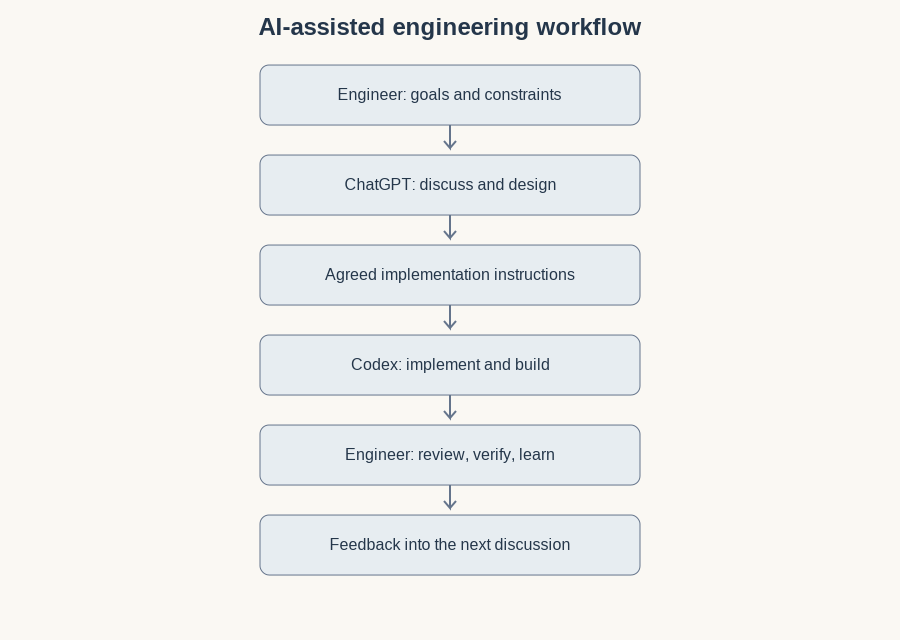
My workflow is therefore an iterative one. I discuss the problem with ChatGPT, establish the requirements, develop a prompt for Codex, review what Codex produces and then decide what needs to happen next. Sometimes the implementation reveals something that we hadn’t considered during the original discussion, in which case we return to the design and reconsider our approach.
I don’t expect AI to get everything right the first time, any more than I expect myself to get everything right the first time. Engineering is an iterative process, and incorporating AI into that process doesn’t change its fundamental nature.
What it does change is the amount of work I can delegate. I can spend more of my time making engineering decisions and less of my time performing some of the mechanical work involved in implementing those decisions.
At least, that’s the theory.
AI as a debugging assistant
Not everything I do with AI involves generating code or metadata. In fact, one of the areas in which I find AI most useful is investigating technical problems.
Anybody who has spent much time working with Yocto will be familiar with the experience of scrolling through several thousand lines of build output trying to find the error that actually matters. AI is particularly useful at extracting relevant information from that output, allowing me to concentrate on understanding the problem rather than searching for it.
I generally prefer to work interactively when investigating a complicated problem. I provide the evidence I have, discuss what that evidence tells us and establish what we need to investigate next. I then perform the investigation and provide the results before we decide how to proceed.
What I don’t particularly want is a list of ten possible causes followed by ten things to try. I want to understand what has gone wrong and why the proposed solution is appropriate.
This approach also has considerable educational value for engineers who are relatively new to Yocto. Rather than simply asking AI to fix a build failure, they can use it to understand the failure, learn about the relevant Yocto mechanisms and develop their own debugging skills.
Unfortunately, as I have discovered on several occasions, AI can also be remarkably good at investigating things that don’t really need investigating. I’ll be discussing some of those experiences later in this series.
Delegating work is not delegating responsibility
When Codex has completed a task, I still need to review what it has produced. A successful build is useful evidence, but it doesn’t necessarily tell me whether the resulting implementation is appropriate.
If Codex introduces a patch to an upstream application, I want to understand why that patch is necessary. If it modifies the distribution configuration, I want to understand what else might be affected by that modification. If it creates a new class or introduces a custom task, I want to understand why the existing Yocto mechanisms weren’t sufficient.
There may be perfectly good reasons for all of those decisions, but I need to understand them before I accept the implementation. If a commit has my name on it, I need to be able to defend it.
This is particularly important when developing embedded Linux systems that may be maintained for many years. The engineer who has to upgrade the Yocto release in three years’ time isn’t going to be particularly interested in how quickly the original metadata was generated. They are going to be interested in whether they can understand it, whether it is maintainable and whether it makes appropriate use of the mechanisms provided by Yocto.
That future engineer might well be me and I have spent far too long looking at some of my old code trying to remember what I did and why!
Putting AI to the test
In preparation for my talk at the Yocto Project Summit, I decided to conduct a series of experiments to investigate some of these issues in more detail.
Rather than selecting tasks specifically because I thought AI would be good at them, I wanted to investigate tasks that I regularly encounter when working on Yocto projects. I also wanted to consider the quality of the resulting implementation, rather than simply measuring how long it took to achieve a successful build.
Over the course of this series, I’ll be exploring the following subjects.
Part 2 — Creating Yocto Recipes: AI, devtool or vi?
Yocto already provides us with tools to assist with creating recipes. Does introducing AI offer any significant advantages? I’ll compare the results of creating recipes for two applications of considerably different complexity and discuss what those results actually tell us about engineering productivity.
Part 3 — A Working Yocto Project Isn’t Necessarily a Good Yocto Project
How do we recognise unnecessary complexity, and what are the longer-term consequences of accepting implementations simply because they work? I’ll explore project organisation, maintainability and the importance of understanding what Yocto already provides before developing our own solutions.
Part 4 — Can AI Design a Production Yocto System?
What happens when we give AI a more substantial set of requirements involving development and production images, security requirements and architectural decisions? I’ll examine the results of an experiment using the PocketBeagle 2 and discuss some of the decisions I would have made differently.
Part 5 — Debugging Yocto with AI: Less Reading, More Thinking
I’ll explore how I use AI to investigate build failures, understand technical problems and develop solutions. I’ll also discuss some of the occasions when AI has managed to make the debugging process considerably more frustrating than it needed to be.
Part 6 — Use AI to Become a Better Yocto Engineer
Finally, I’ll bring together the lessons from the experiments and discuss how engineers can use AI to develop their own knowledge and capabilities. This will include communicating engineering requirements effectively, crafting useful prompts, evaluating implementations and developing engineering judgement.
Another tool in the toolbox
I have been incorporating AI into my engineering workflow for some time, with varying degrees of success. There have been occasions when it has saved me hours of work, occasions when I could have done the job quicker myself and occasions when I’ve ended up shouting at the AI rather than the computer.
As engineers, we have always had tools to make our lives easier. AI is another one of those tools. Part of being an engineer is knowing which tool to use, when to use it and, sometimes, when not to use a tool at all.
What interests me is not whether AI can replace the work of a Yocto engineer, but whether it can help us become more effective Yocto engineers.
So, let’s see where AI fits into my toolbox.
Related posts
Browse all postsApple Said My MacBook Was Obsolete. Nobody Told the MacBook.
Turning a 2017 MacBook Pro into a Yocto-based Linux workstation, from a black screen and an unexpected SSD layout to Xfce and native BitBake builds.

Building a Matter Light switch with Yocto: From a String of LEDs to Apple Home
A Lego house, a cheap Raspberry Pi Zero W and a string of LEDs led to a deep dive into integrating Matter with Yocto, from GN and BitBake to GPIO control, commissioning and persistent Matter state.
Yocto Cheat Sheet: BitBake Commands, Recipes, Variables and Debugging
A practical Yocto cheat sheet covering common BitBake commands, recipes, bbappend files, variables, packages, debugging and useful build paths.