Articles
One Yocto Machine, Several WIC Layouts
Selecting different Yocto WIC partition layouts by image purpose and deployment target, while keeping a sensible machine-level default
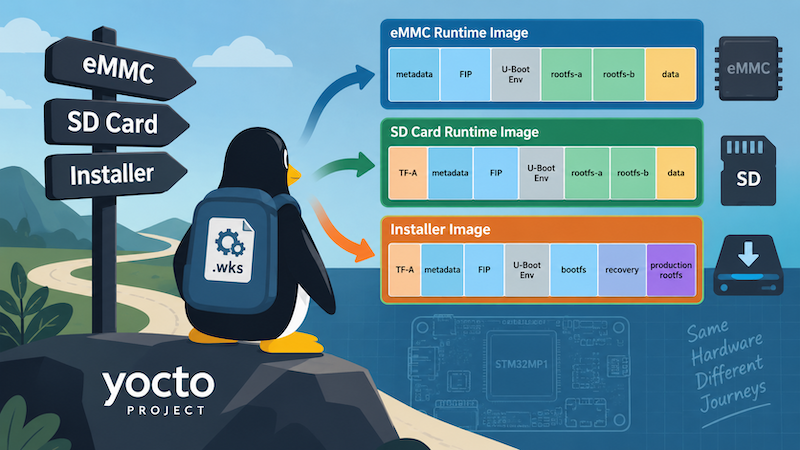
I recently reached the point in a Yocto project where having one WIC layout for a machine was no longer enough.
The project had started with a straightforward arrangement: one machine configuration, one main image and one disk layout. The WKS_FILE setting therefore lived naturally in the machine configuration.
That worked until I had several different things to build for the same hardware. An installer image needed a completely different disk layout, while the normal system image needed a different boot layout depending on whether it was going onto eMMC or an SD card.
The interesting part wasn’t how to write another .wks file. It was deciding what should select it.
Starting with one layout per machine
WIC is the part of the Yocto build I was using to turn the filesystem and bootloader artifacts into a complete partitioned disk image.
The .wks file describes that disk: which partitions it contains, their sizes and offsets, and which files should be written into them. WKS_FILE tells the OpenEmbedded build which kickstart file to use when creating the .wic image.
Originally I selected that in the machine configuration:
WKS_FILE = "stm32mp157a-board.wks.in"This made sense at the time. The hardware had one deployment model, so there wasn’t any practical distinction between “the layout for this machine” and “the layout for this image”.
The default layout was an A/B eMMC layout containing the TF-A firmware update metadata, two FIP slots, a U-Boot environment, two root filesystem slots and persistent data.
The beginning looked like this:
# TF-A FWU metadata first copy: 512 KiB
part --source rawcopy \
    --sourceparams="file=arm-trusted-firmware/metadata.bin" \
    --ondisk mmcblk \
    --offset 1024s \
    --fixed-size 512K \
    --part-name metadata1 \
    --part-type 8A7A84A0-8387-40F6-AB41-A8B9A5A60D23

# TF-A FWU metadata second copy: 512 KiB
part --source rawcopy \
    --sourceparams="file=arm-trusted-firmware/metadata.bin" \
    --ondisk mmcblk \
    --offset 2048s \
    --fixed-size 512K \
    --part-name metadata2 \
    --part-type 8A7A84A0-8387-40F6-AB41-A8B9A5A60D23

# Active FIP slot: 4 MiB
part --source rawcopy \
    --sourceparams="file=fip/${STM32_FIP_IMAGE}" \
    --ondisk mmcblk \
    --offset 3072s \
    --fixed-size 4M \
    --part-name fip-a \
    --part-type 19D5DF83-11B0-457B-BE2C-7559C13142A5 \
    --uuid 2795A896-4A20-4573-9C92-6C559F5771F5

# Empty alternate FIP slot: 4 MiB
part --ondisk mmcblk \
    --offset 11264s \
    --fixed-size 4M \
    --part-name fip-b \
    --part-type 19D5DF83-11B0-457B-BE2C-7559C13142A5 \
    --uuid D6A2C755-5143-427B-9A45-107F4AEE9E53

# Empty U-Boot environment partition: 512 KiB
part --ondisk mmcblk \
    --offset 19456s \
    --fixed-size 512K \
    --part-name u-boot-env \
    --part-type 3DE21764-95DB-54BD-A5C3-4ABE786F38A8
The two root filesystem slots followed (not used by the bmaptool):
# rootfs-a
part --source rawcopy \
    --sourceparams="file=${IMGDEPLOYDIR}/${IMAGE_BASENAME}-${MACHINE}.rootfs.ext4" \
    --ondisk mmcblk \
    --offset 20480s \
    --fixed-size 1024M \
    --fstype ext4 \
    --label rootfs-a \
    --part-name rootfs-a \
    --part-type 0FC63DAF-8483-4772-8E79-3D69D8477DE4 \
    --uuid C0DEA51A-1071-4218-ABE2-A010121468A3 \
    --active

# rootfs-b - leave empty for initial flash
part --ondisk mmcblk \
    --offset 2117632s \
    --fixed-size 1024M \
    --fstype ext4 \
    --label rootfs-b \
    --part-name rootfs-b \
    --part-type 0FC63DAF-8483-4772-8E79-3D69D8477DE4 \
    --uuid 90F1A1E2-0140-4CC1-89D9-A2EF059C103E
Conceptually, the eMMC user area looked like this:
+-----------+-----------+-------+-------+-----------+----------+----------+--------+
| metadata1 | metadata2 | fip-a | fip-b | uboot-env | rootfs-a | rootfs-b | data   |
+-----------+-----------+-------+-------+-----------+----------+----------+--------+
TF-A itself isn’t in this partition table. On eMMC it lives in the dedicated boot0 and boot1 hardware boot areas.
An Installer Image
The first complication was an installer image.
The installer was intended to boot from an SD card and contained not just its own boot and recovery filesystems but also the production filesystem that it would ultimately install.
Its disk layout was therefore quite different from the normal A/B runtime image:
+-------+-------+-----------+-----------+-------+-------+-----------+--------+------------+-----------------+
| fsbl1 | fsbl2 | metadata1 | metadata2 | fip-a | fip-b | uboot-env | bootfs | installfs  | production root |
+-------+-------+-----------+-----------+-------+-------+-----------+--------+------------+-----------------+
That isn’t a small variation on the machine’s normal disk layout. It is a disk image with a different job. Rather than changing the machine configuration, I selected the installer kickstart file directly in the installer image recipe:
WKS_FILE = "stm32mp157a-board-installer.wks.in"The machine could continue to provide the normal default, while this particular image replaced it because its requirements were different.
That gave me:
                         machine.conf
                              |
                      default WKS_FILE
                              |
              +---------------+---------------+
              |                               |
         normal image                  installer image
              |                               |
       machine default                   WKS_FILE =
                                         installer.wks.in
The useful distinction here is that the hardware hadn’t changed. What changed was the purpose of the image.
SD card and eMMC needed different layouts too
The next requirement exposed another dimension to the same problem. I wanted to do development on an SDCard, as it is easier to remove the SDCard from the board, quickly flash it with bmaptool and boot up again. When doing lots of changes in the early boot development, this makes more sense than having to re-flash the eMMC each time.
Even for the normal runtime system, I couldn’t use exactly the same layout for an SD card and eMMC because of the STM32MP1 boot chain.
For eMMC, TF-A could be written to the dedicated eMMC boot hardware areas. Those sit outside the normal user-area GPT handled by this WIC image. An SD card has no equivalent boot0 and boot1 areas, so the TF-A copies had to become part of the partitioned disk image itself.
The SD-card WKS therefore starts with two additional partitions:
# TF-A first copy: 256 KiB
part --source rawcopy \
    --sourceparams="file=arm-trusted-firmware/${STM32_TFA_IMAGE}" \
    --ondisk mmcblk \
    --offset 34s \
    --fixed-size 256K \
    --part-name fsbl1 \
    --part-type 8DA63339-0007-60C0-C436-083AC8230908

# TF-A second copy: 256 KiB
part --source rawcopy \
    --sourceparams="file=arm-trusted-firmware/${STM32_TFA_IMAGE}" \
    --ondisk mmcblk \
    --offset 546s \
    --fixed-size 256K \
    --part-name fsbl2 \
    --part-type 8DA63339-0007-60C0-C436-083AC8230908
The FWU metadata follows those:
# TF-A FWU metadata first copy: 256 KiB
part --source rawcopy \
    --sourceparams="file=arm-trusted-firmware/metadata.bin" \
    --ondisk mmcblk \
    --offset 1058s \
    --fixed-size 256K \
    --part-name metadata1 \
    --part-type 8A7A84A0-8387-40F6-AB41-A8B9A5A60D23

# TF-A FWU metadata second copy: 256 KiB
part --source rawcopy \
    --sourceparams="file=arm-trusted-firmware/metadata.bin" \
    --ondisk mmcblk \
    --offset 1570s \
    --fixed-size 256K \
    --part-name metadata2 \
    --part-type 8A7A84A0-8387-40F6-AB41-A8B9A5A60D23
The rest of the disk retained the A/B arrangement:
eMMC
=====

eMMC hardware areas:
+------------+------------+
| TF-A copy 1| TF-A copy 2|
+------------+------------+

eMMC user area:
+-----------+-----------+-------+-------+-----------+----------+----------+------+
| metadata1 | metadata2 | fip-a | fip-b | uboot-env | rootfs-a | rootfs-b | data |
+-----------+-----------+-------+-------+-----------+----------+----------+------+


SD card
=======

+-------+-------+-----------+-----------+-------+-------+-----------+----------+----------+------+
| fsbl1 | fsbl2 | metadata1 | metadata2 | fip-a | fip-b | uboot-env | rootfs-a | rootfs-b | data |
+-------+-------+-----------+-----------+-------+-------+-----------+----------+----------+------+
This was still the same machine and effectively the same runtime system. What changed was the storage target.
I selected the appropriate WKS file based on a project feature identifying an SD-card target:
WKS_FILE = "${@bb.utils.contains('PROJECT_FEATURES', 'target-sdcard', \
    'stm32mp157a-board-sdcard.wks.in', \
'stm32mp157a-board-emmc.wks.in', d)}"bb.utils.contains() tests whether target-sdcard is present in the space-separated feature variable. If it is, BitBake expands WKS_FILE to the SD-card kickstart file. Otherwise it selects the eMMC version.
The important part wasn’t using an inline Python expression. It was that the decision now depended on something other than the machine:
                     normal image
                          |
                   deployment target
                    /             \
                  SD               eMMC
                  |                 |
            sdcard.wks.in     emmc.wks.in
At this point the original assumption that there was one disk layout associated with the machine clearly no longer described what I was building.
The installer needed another image’s filesystem
Selecting the correct WKS file turned out to be only part of the installer problem.
The installer had its own bootfs and installer root filesystem:
# Existing 64 MiB bootfs ext4 image
part /boot \
    --source rawcopy \
    --sourceparams="file=${IMGDEPLOYDIR}/${IMAGE_BASENAME}-${MACHINE}.splitted-bootfs.ext4" \
    --ondisk mmcblk \
    --offset 19490s \
    --fixed-size 64M \
    --fstype ext4 \
    --label bootfs \
    --part-name bootfs \
    --part-type 0FC63DAF-8483-4772-8E79-3D69D8477DE4 \
    --active

# Existing rootfs ext4 image
part / \
    --source rawcopy \
    --sourceparams="file=${IMGDEPLOYDIR}/${IMAGE_BASENAME}-${MACHINE}.splitted-rootfs.ext4" \
    --ondisk mmcblk \
    --offset 150562s \
    --fstype ext4 \
    --label installfs \
    --part-name installfs \
    --part-type 0FC63DAF-8483-4772-8E79-3D69D8477DE4 \
    --uuid 01f5b468-aa21-49a7-888f-9fed3c92d2cf
Both of those are associated with the installer image currently being built.
The installer also needed to carry the filesystem from the production image, however:
# Production/main root filesystem
part --source rawcopy \
    --sourceparams="file=production-image-stm32mp1.splitted-rootfs.ext4" \
    --ondisk mmcblk \
    --fstype ext4 \
    --label rootfs \
    --part-name rootfs \
    --part-type 0FC63DAF-8483-4772-8E79-3D69D8477DE4 \
    --uuid e91c4e10-16e6-4c0e-bd0e-77becf4a3582
This is an important distinction.
The installer wasn’t sharing the production image’s WIC layout. It had its own layout, but one of the things placed into that layout happened to be an artifact produced while building another image.
Those are separate concerns:
WKS_FILE
    |
    +-- Which partition layout should this image use?


WKS contents
    |
    +-- Which artifacts should be placed into those partitions?


BitBake task graph
    |
    +-- Have the tasks producing those artifacts run yet?
The third part is easy to overlook.
A filename isn’t a dependency
Putting the name of another image’s filesystem into a .wks file tells WIC which file it should consume.
It doesn’t tell BitBake that it must build the task that creates that file first.
In the installer image I had an explicit dependency on the production image - as this needed to exist before it could be included in the install image:
do_image[depends] += "production-image:do_image_complete"BitBake’s [depends] task flag is specifically intended for inter-task dependencies: the named task must complete before the task carrying the dependency can execute.
There was a second ordering requirement for the installer’s own split files.
The STM32 image handling I was using created separate boot and root filesystem images in do_image_stsplitpartitions. WIC needed those files, so I made that relationship explicit as well:
# Please do the split partitions BEFORE creating the wic image
# otherwise the splitted files will not exist to be flashed
# into the wic file.
do_image_wic[depends] += "${PN}:do_image_stsplitpartitions"
Together with the installer-specific WKS selection, the relevant part of the image recipe ended up as:
# Make sure the production image has been built.
do_image[depends] += "production-image:do_image_complete"

# This image has its own storage layout.
WKS_FILE = "stm32mp157a-board-installer.wks.in"

# WIC consumes the split bootfs/rootfs generated for this image.
do_image_wic[depends] += "${PN}:do_image_stsplitpartitions"
This exposed a useful distinction that is easy to miss when working with files under Yocto’s build and deploy directories:
WIC works with files. BitBake schedules tasks. If one of those files is produced by another task or another recipe, the task graph still needs to represent that relationship.
IMGDEPLOYDIR mattered as well
There was another timing detail around the installer’s own split images.
My WKS contained this comment:
# Have to use ${IMGDEPLOYDIR} because stsplittedimage does not put the split images
# until AFTER all the images files (i.e. the wic image) have been created.
# This pulls the split images from the `work` directory not the `deploy` directory
That is why the installer’s own split images were referenced as:
${IMGDEPLOYDIR}/${IMAGE_BASENAME}-${MACHINE}.splitted-bootfs.ext4and:
${IMGDEPLOYDIR}/${IMAGE_BASENAME}-${MACHINE}.splitted-rootfs.ext4rather than assuming that the final copies in the shared deploy directory already existed.
The ordering here matters. do_image_wic needed to consume these files before the later deployment of all the final image artifacts had completed.
The explicit dependency:
do_image_wic[depends] += "${PN}:do_image_stsplitpartitions"made sure the split files had actually been created first.
This was a different issue from selecting the appropriate WKS file, but the two met in exactly the same place: WIC could only assemble the image once both the layout and all of the files referenced by that layout were available.
What I ended up with
By this point there wasn’t really such a thing as “the WIC layout for the machine”.
There were several layouts for the same hardware:
eMMC runtime                 SD runtime                    SD installer
------------                 ----------                    ------------

metadata1                    fsbl1                         fsbl1
metadata2                    fsbl2                         fsbl2
fip-a                        metadata1                     metadata1
fip-b                        metadata2                     metadata2
u-boot-env                   fip-a                         fip-a
rootfs-a                     fip-b                         fip-b
rootfs-b                     u-boot-env                    u-boot-env
data                         rootfs-a                      bootfs
                             rootfs-b                      installfs
                             data                          production rootfs
They differed for two different reasons.
The installer had another layout because the image had a different purpose.
The SD-card runtime image had another layout because the deployment medium had different boot requirements.
Those are not the same decision, even though both eventually result in selecting a different value for WKS_FILE.
Where does the layout belong?
This work changed how I think about settings such as WKS_FILE.
It is tempting to classify configuration by where it currently lives. If WKS_FILE has always been in machine.conf, it is easy to start thinking of the partition layout as intrinsically part of the machine.
That wasn’t really true here.
I ended up with something closer to:
                         MACHINE
                            |
                     sensible default
                            |
              +-------------+-------------+
              |                           |
         normal image               installer image
              |                           |
       deployment target              own layout
          /       \
        SD         eMMC
        |            |
     SD WKS       eMMC WKS
The machine configuration still had value. It provided a sensible default for the hardware.
The mistake would have been assuming that because the default lived in machine.conf, every image for that machine must necessarily use it.
A useful question is therefore not simply “where should WKS_FILE be set?” but:
What information determines the correct layout?
If the answer really is the hardware, machine configuration can be exactly the right place.
If an installer has its own deployment requirements, the image recipe may be the right place to replace that default.
If the layout depends on whether the output is destined for SD card or eMMC, the configuration that knows the deployment target needs to participate in the decision.
The scope should follow what the configuration actually represents.
This isn’t unique to WIC. Yocto projects often start with one machine, one image and one way of deploying it, so the distinction between hardware configuration and product policy doesn’t initially matter very much. As the project grows, those assumptions start to become visible.
In this case WIC just made the distinction rather difficult to ignore.
Related posts
Browse all posts
Populating a Partition
Use Yocto and WIC to include a dedicated ext4 data partition in your disk image.
TALES FROM THE TRENCHES · #3
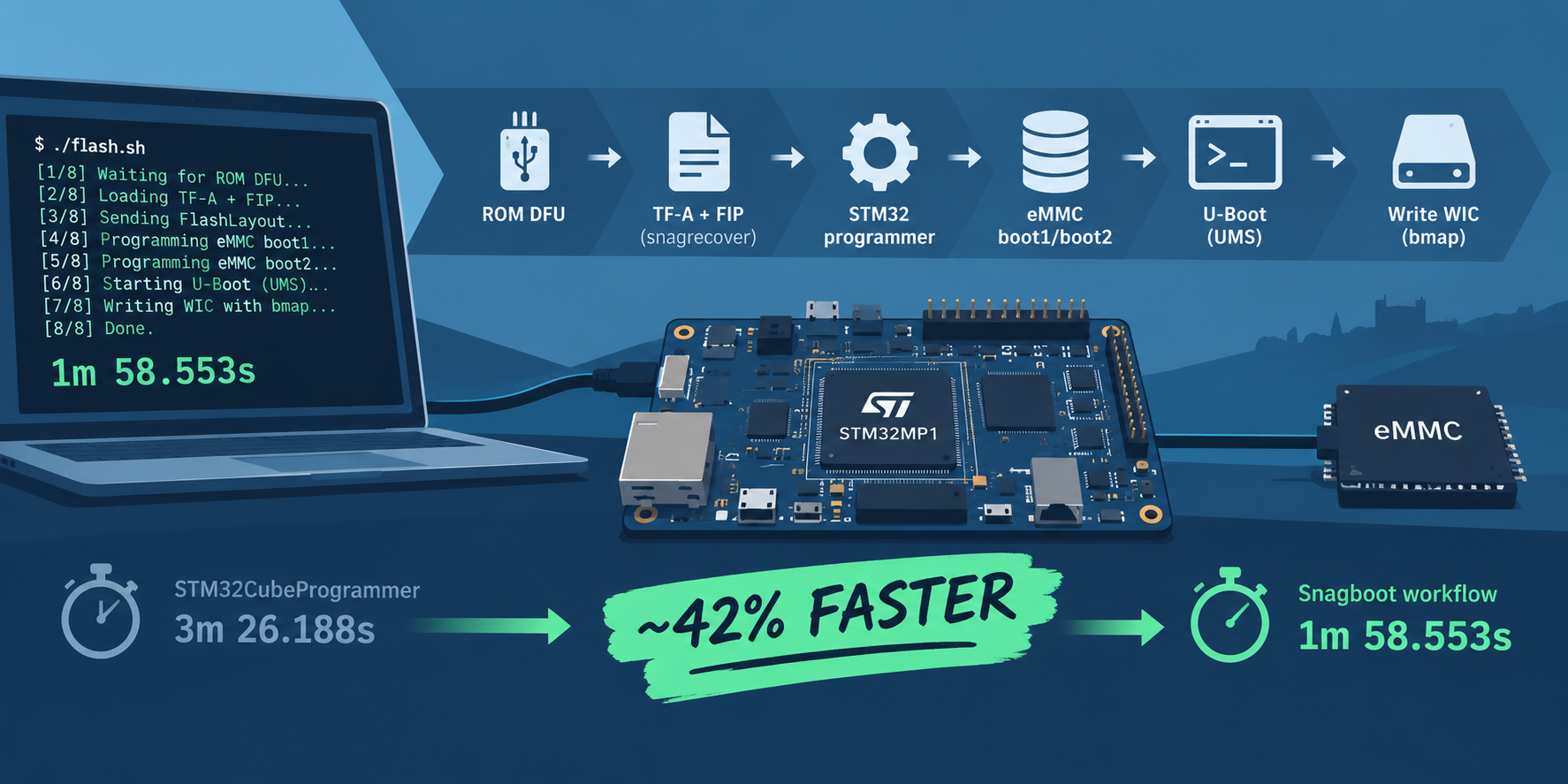
Speeding up Flashing eMMC for the STM32MP1
Improving the time to flash eMMC by replacing STM32CubeProgrammer with snagboot
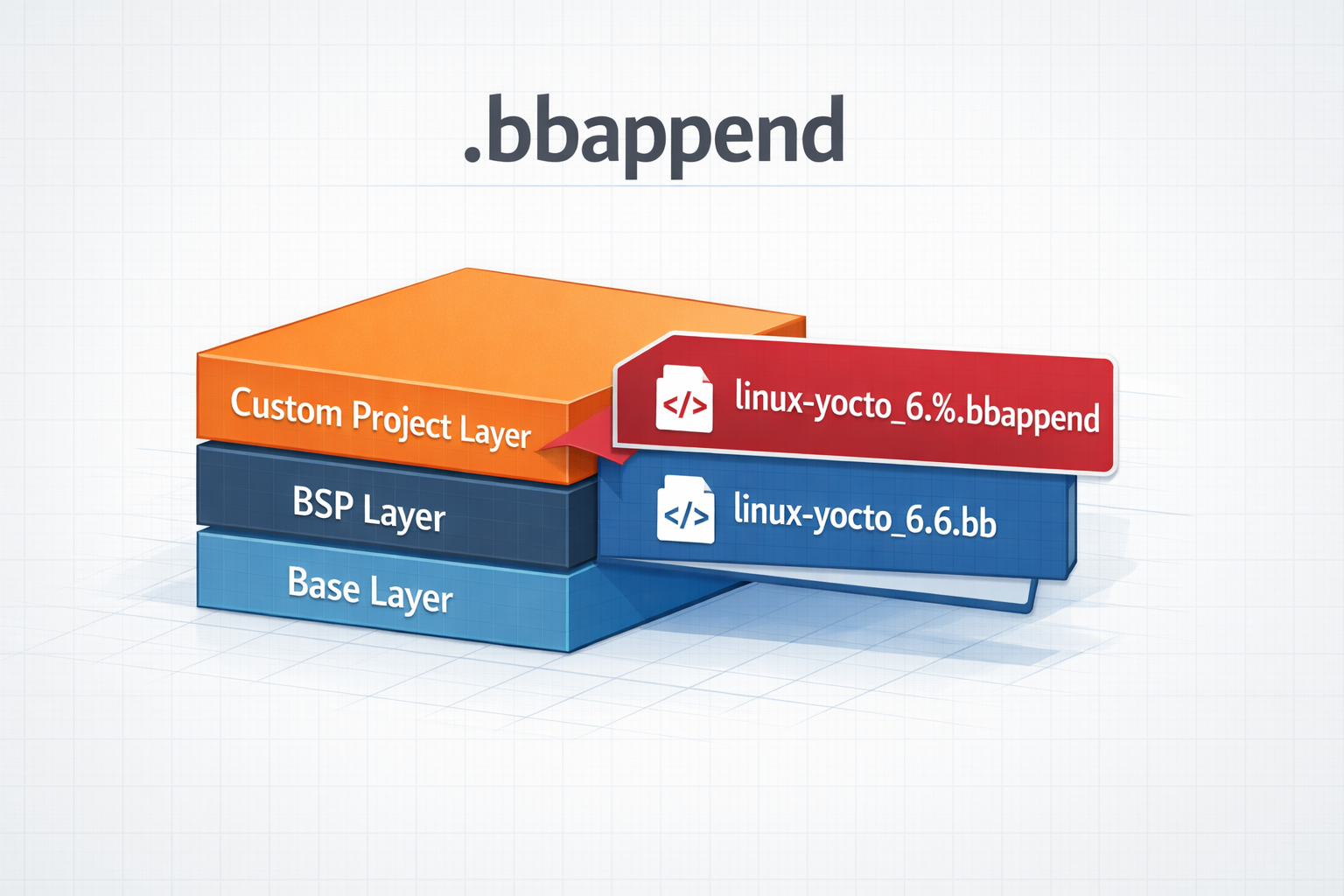
.bbappend files in a Yocto Project
How to use .bbappend files in a Yocto Project - A brief guide